-
Overview
-
Q & A
-
Practical sheets
-
- Add a NetBackup User
- Backing up a VM
- Backup : Agent-Level B&R via NSS for IAAS offer
- Checking Backup Prerequisites
- Daily Reporting
- Deleting a VM Backup
- Identifying Your Backup Master Server
- NetBackup Portal
- New billing model
- NSS Home Page
- NSS Swagger APIs
- Restoring a VM
- Troubleshooting Netbackup Errors
- VM Agent Restoration Mode
-
-
- Aucun article
-
-
- Aucun article
-
-
-
- Backup : Agent-Level B&R via NSS for IAAS offer
- Backup : Create VCOD Backup
- Backup : Netbackup Agent Installation for Linux
- Backup : Netbackup Agent Installation for Windows
- Backup : Overall Design for VCOD Offer
- Backup : User's Guide for VCOD Offer
- NSX-T : Configuring a Distributed Firewall
- NSX-T : Create VPN Ipsec
- NSX-T : Creation of T1
- NSX-T : DNAT configuration
- NSX-T : How to configure a Gateway Firewall
- NSX-T : SNAT configuration
- NSX-T: Create and Configure a Geneve Overlay Segment
- NSX-T: How to configure an IPSEC solution
- Parcours Client Sauvegarde WORM pour l'Offre VCOD STD
- vCenter : Clone a VM
- VCenter : Create a new VM
- VCenter : Create a snapshot of a VM
- VCenter : Reset cloudadmin password
- VCenter : Storage Vmotion on a VM
- VCenter : Upgrade Vmware tools on a VM
- WORM Backup Customer Journey for VCOD STD Offering
-
-
Services
-
-
-
- Aucun article
-
-
- Aucun article
-
- Aucun article
-
- Aucun article
-
BES2 Access
Overview
The Direct Connect BES2 option provides Layer 2 connectivity, enabling secure interconnection between the infrastructure hosted at the client’s premises and their cloud infrastructure hosted at Cloud Avenue.
Diagram
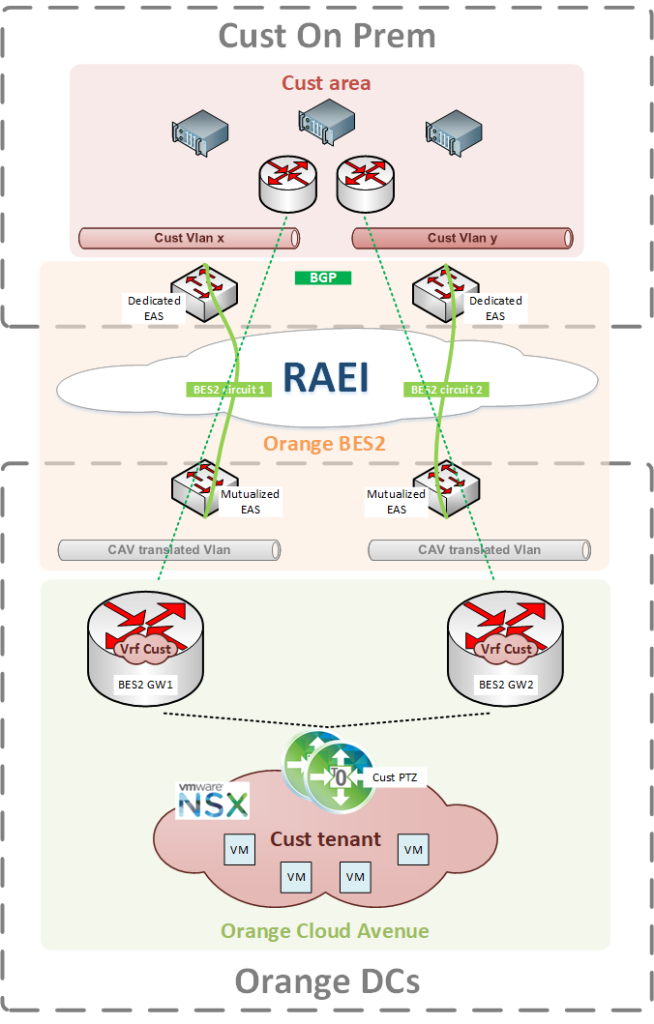
Use Case
The Direct Connect BES2 option addresses the following use case:
Connecting the client’s On-Premise infrastructure with their Cloud environment at Cloud Avenue.
Prerequisites
To benefit from this option, the client must:
- Have subscribed to a secure Orange BES2 offer
- Have planned the necessary space to install the BES2 endpoint equipment (EAS) at their premises
- Have arranged the connectivity to connect the BES2 endpoint equipment (EAS)
- Be able to provide 2 interconnection VLANs
- Have network equipment capable of dynamic BGP routing
It can be deployed in a single-site configuration at Val de Reuil or Chartres, or in a Dual Site setup with link redundancy in all scenarios, as shown in the diagram above.
Important Note:
Attention: If the client’s equipment is not BGP-compatible,
it is possible to establish a connection using static routing.
In this case, VRRP (or HSRP) protocol must be used.
Please note that resilience will be lower compared to using BGP.
Voici la traduction en anglais de votre texte :
Billing and Ordering
There is no additional cost for interconnection between BES2 and Cloud Avenue. The only requirement is to have subscribed to the Business Ethernet offer.
Si vous souhaitez une mise en forme spécifique ou une présentation, n’hésitez pas à me le demander !