Database as a Service (DBaaS)
Database as a Service is a managed solution offered by Cloud Avenue, which delivers fully managed databases to Cloud Avenue Tenants. Managed Database services on Cloud Avenue IaaS is based on VMware virtualization solution integrated with community and as well as licensed database solution. It is designed to simplify the deployment and operation of databases. It offers a secure, scalable, multi tenancy and ready-to-use database instance without the need to manage underlying infrastructure.
As a managed service solution, DBaaS offers:
- Simplified and Automated Management: Like patching, backups, and upgrades, which frees the customer database administrators (DBAs) time required for administrative tasks
- Scalability and Flexibility: Database resource can be scaled up instantly to meet increasing demands.
- User friendly UI to perform tasks such as provisioning, monitoring, and configuring databases without requiring extensive technical expertise.
- High Availability and Disaster Recovery: Automated fail-over and built-in dual room high availability option.
- Visibility into the database usage and performance without the need for customer-deployed monitoring infrastructure.
Overview
CAV Managed Database service (DBaaS) solution is hosted on Cloud Avenue’s IaaS infrastructure based on VMware Cloud Director. Access to DBaaS service is only available to CAV Tenant.
Service Capabilities
Database Service (DBaaS) is a reliable and scalable cloud database service. On the DBaaS portal, you can perform almost all necessary tasks, it simplifies operations and reduces routine O&M workloads, so you can stay focused on application and service development
- DB Instances
The smallest management unit of RDS is the DB instance. A DB instance is an isolated database environment on the cloud. Each DB instance runs a DB engine have a fixed specification, engines, versions, and status.
- DB Engines: It supports the following DB engines and versions:
| DB Engine | Versions |
| MongoDB | 7.0 |
| MySQL | 8.0 |
| PostgreSQL | 16.2 |
| 15.7 |
- DB Instance Types
DB instances are classified into the following types: single, primary/ standby and replica. Single or Primary instance and standby or replica instances are stored on different storage running in separate rooms.
- DB Instance Classes
DB instance class define the specification for the instances which include the vCPU, vRAM and Storage size (usable by database). Currently Four Instance classes exist namely Basic, Standard and Advance. User are allowed to select storage a from a list of different Storage type.
Following table list the details of each class and supported DB Engine Type:
| Instance Class | CPU | RAM | Storage* (GB) | Supported DB Engine |
| Mini | 1 | 2 | 60 | PostgreSQL, MySQL, MongoDB |
| Basic | 2 | 4 | 60 | PostgreSQL, MySQL, MongoDB |
| Standard | 4 | 8 | 120 | PostgreSQL, MySQL, MongoDB |
| Advance | 12 | 16 | 300 | PostgreSQL, MySQL, MongoDB |
Note: The storage size mentioned above is for the user database partition only and doesn’t include the space required for archive, log, backup etc. Customer has the option to choose the disk type.
- DB Instance Storage Type
DB instance storage type define the performance specification for the disks available for database. Currently Four performance type are available namely Silver, Gold, Platinum3k and Platinum7k. Database usable space can be increased till 6TB.
Following table list the performance details of each type:
| Class of services | Maximum IOPS Limit |
| Silver | 600 IOPS/TB |
| Gold | 1000 IOPS/TB |
| Platinum 3k | 3000 IOPS/TB |
| Platinum 7k | 7000 IOPS/TB |
- Automated Backup
When a DB instance is created a backup retention must be chosen and default enabled is 7days. DBaaS scheduler will automatically create full backup for DB instances based on your settings, while an incremental backup is scheduled every 15 minutes. This can be increased via request to service desk. Currently four standard retention (3 days / 7 days /15 days /30 days) is available for customer to choose from.
Backups are stored on same performance tier disks for a maximum of 3 days providing faster recovery. Any retention more than 3 days would store backups older than 3 days on Object Storage, this can be changed to similar performance storage as database at extra cost via opening a service request.
Standard Backup Schedule is applied to each Database while the retention is chosen by Customer, this schedule if needed can be modified on request.
| DB Engine | Full Backup | Log Backup |
| MongoDB | Everyday @ 01 hrs | Every 30 min |
| MySQL | Everyday @ 00 hrs | Every 30 min |
| PostgreSQL | Everyday @ 23 hrs | Every 30 min |
Functions
Below is the list of function available for each DB engine either in self-service mode or with service request to help desk. Features which are mentioned here available via support are targeted to be in self-service portal with next release of the self-service portal.
| Available in Self Service Portal | Available via Support Request | |||
| Functions | PostgreSQL | MongoDB | MySQL | |
| Provisioning | ✅ | ✅ | ✅ | |
| High Availability (HA) Setup | ✅ | ✅ | ✅ | |
| Service Management (Stop/Start/Restart) | ✅ | ✅ | ✅ | |
| Scale up resources (CPU or RAM or Disk) | ✅ | ✅ | ✅ | |
| Parameter settings | ✅ | |||
| SSL | ✅ | |||
| Backup Retention | ✅ | ✅ | ✅ | |
| Restoration (either Complete Full Backup or Point in Time Backup) | ✅ | ✅ | ✅ | |
| Monitoring of Databases | ✅ | ✅ | ✅ | |
| View and download system logs | ✅ | |||
| View and download slow query logs | ✅ | |||
Service Model
Database Service (DBaaS) solution is based on Cloud Avenue IaaS where the DB instance are managed in a secure and dedicated tenant managed by Orange Business. The model is based on an architecture with shared responsibility:
| Component | Operated by Orange Business | Operated by the customer |
| Self Service Portal / API | ✅ | |
| VMware Infrastructure, NSX-T, Storage | ✅ | |
| Orchestration, Logging and Monitoring | ✅ | |
| DB instance creation / modification / deletion | ✅ | |
| Set Backup Retention on DB instance | | ✅ |
| Patching & Upgrades | ✅ | |
| Backup DB instances | ✅ | |
| Restore DB instances | ✅ | |
| User management for Self Service Portal | ✅ |
The client get admin access to his tenant on the DBaaS Self Service Portal (API, Web, Monitoring etc.) and is responsible to create any other users with full or restricted role as per need.
Architecture and Principles
The offer is based on a standardized architecture
- DBaaS solution hosted on IaaS and services exposed on ECC service zone,
- DBaaS self-service portal providing the capability to independently provision, configure, and manage databases,
- Isolated NSX-T segment, interconnected via BGP / NAT,
- ECC service connect the customer tenant to DBaaS Infrastructure
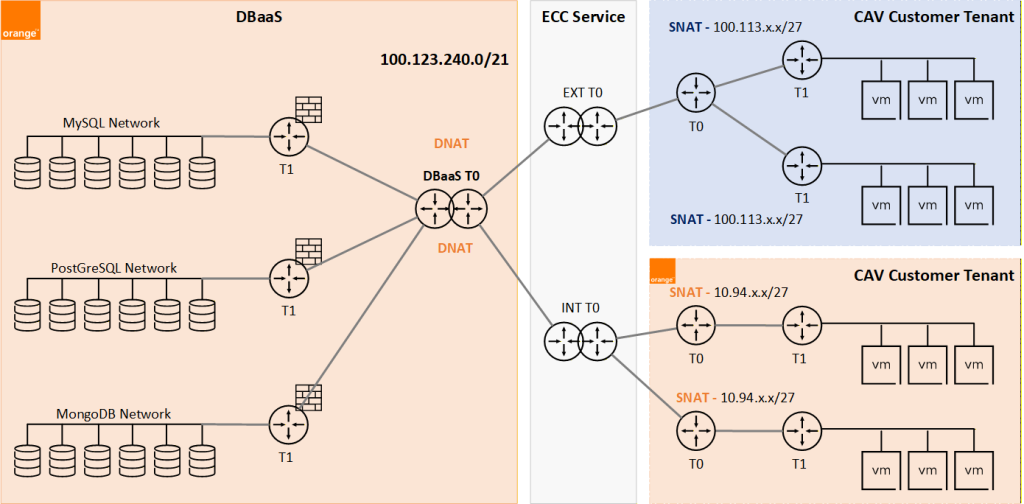
DBaaS solution relies on SNAT / DNAT translation for communication between the customer application / client VM with Customer DBaaS database Instance.
Location of the service
DBaaS solution are hosted in the Orange Business data centers of Val-de-Reuil, within the Cloud Avenue platform and is supervised 24/7.
Administration Interface
The customer has full access to his DBaaS Tenant via:
- DBaaS Self-Service Portal: complete provisioning, monitoring, and configuring databases, account management, etc.
- API: CI/CD integration, IaC.
DBaaS Self-Service Portal URL:
https://dbaas.cloudavenue.orange-business.com/
Authentication is provided via a separate user credential, created during the DBaaS subscription request.
Maintenance and supervision
Orange Business provides supervision and maintenance of the databases deployed by the customer.
- Database Engine Fixes and Updates (Minors & Security Patches),
- Management of certificates,
- 24/7 monitoring, alerting,
- Scheduled operations with prior notification.
Scheduled Maintenance window for different operations is defined in below table:
| Maintenance Operations | Operations Window (Paris time) – 24h format |
| Database patching | Saturday or Sunday (05:30 to 14:30) |
| Server backup | NA |
| Scheduled maintenance | Saturday or Sunday (05:30 to 14:30) |
Support
The support includes:
- Supervision and maintenance of the databases,
- DBaaS Support follows the same process as for the Cloud Avenue Offer (refer to. Support and Coaching).
- Support time range: Monday to Friday, from 09h00 to 18h00 (Paris time), excluding weekends and holidays for Request / Change Management
Pricing
How to order
To subscribe to DBaaS, request can be raised via the Cloud Store / Selfcare portal. To open a Change request and select “Database as a Service” in the Category (refer to DBaaS – Subscription).