Network Storage
Overview
External storage is made available to VMs via IP addresses and according to the protocols chosen by the customer. Network storage is systematically provided in dedicated mode.
The technology used provides, for each Tenant, an SVM (Storage Virtual Machine) which constitutes a dedicated and secure context for the Customer.
Classes des services
| Classe of service | Performance |
Minimum size |
Classe de disponibilité |
|
|
One site |
Dual site asynchron |
|||
| Silver | 600 IOPS/To | 500 Go | ▲ | ▲ |
| Gold | 1000 IOPS/To | 500 Go | ▲ | ▲ |
| Platinium 3k | 3000 IOPS/To | 500 Go | ▲ | ▲ |
The quantity of IOPS actually supplied corresponds to the storage volume ordered times the number of IOPS/GB of the subscribed class of service.
Dual site asynchron means a RPO minimum of 15 minutes.
Example:
500 GB of Platinum 3K network storage enables 1500 IOPS to be used permanently, regardless of the number of VMs using this storage.
Backup
Generally speaking, the customer sets up his own snapshot policy for his network storage.
NAS Snapshop data protection description
Local backup
NAS backup is a service to locally or remotely (cross-site) backup the NAS storage solution.
A customer can take manually or schedule a basic snapshot backup for each volume. Snapshots are read-only images of the file system at a specific point in time, stored locally within the volume space.
The maximum number of snapshots per volume is limited to 1000.
If the client wants to schedule snapshots on their volumes, he can set a snapshot policy per volume selected from a predefined snapshot policies list:
| cust_pol_hourly-6-daily-7 | Hourly | 6 | 7 | – | – |
| cust_pol_daily-7 | Daily | – | 7 | – | – |
| cust_pol_daily-7-weekly-4 | Daily Weekly | – | 7 | 4 | – |
| cust_pol_daily-7-weekly-4-monthly-3 | Daily Weekly Monthly | – | 7 | 4 | 3 |
Remote backup
To secure data with an externally backup solution, one backup storage array is provided per site.
The customer can choose to back up his volumes on the same site as the production or on the remote side as below:
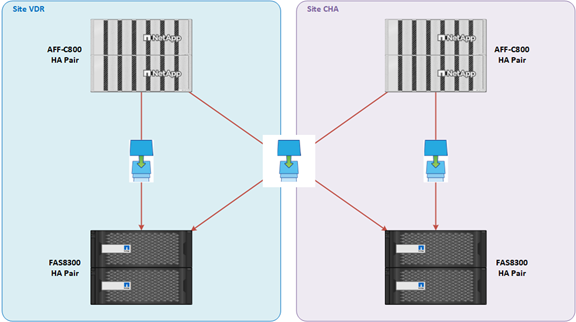
The backup mechanism is based on the NetApp SnapMirror® technology which permits to replicate volume data and snapshots between two NetApp storage arrays with the same or different retention between source and destination.
Local and remote site are not incompatible from the same source volume. A customer can choose to back up a volume only on the same site, only on the remote site or on both sites.
The schedule frequency and retention on the backup storage arrays, the customer will be able to select each policy from list.
Inside the same physical site, the backup array is located in a different room from the main array.
The IOPS limitation per volume is fixed to 600 IOPS per TB.
NAS Backup provisionning request
The provisionning of the NAS backup must be performed by CAV OPS team as this feature is already supported in CAV storage catalog.
This is the process flow.
Please send an email to CAV service desk,: obs-cloud-z3.servicedesk@orange.com.
“One-site” network storage
In this configuration, local storage is used to store snapshots.
The space used for “snapshots” is deducted from the quota subscribed by the customer. Depending on the policy chosen, the customer can reserve between 5% and 20% of the total storage quota for “snapshots”. However, “snapshots” can be activated even without reserved space.
“Replicated dual-site” – Disaster Recovery – Network Storage
Concept & Architecture
Concept of SVM Disaster Recovery is the asynchronous mirroring of SVM data and configuration. You can choose to replicate all or a subset of the SVM configuration (ie excluding the network and protocol configuration)
It permits to secure an SVM by replicating it, through snapmirror (internal function of NetApp), on another NetApp Cluster. That way if the source cluster crashes or if the SVM stops working, we can put back the SVM to work faster than if we restore the datas. It can also be used to have a dual site Disaster Recovery.
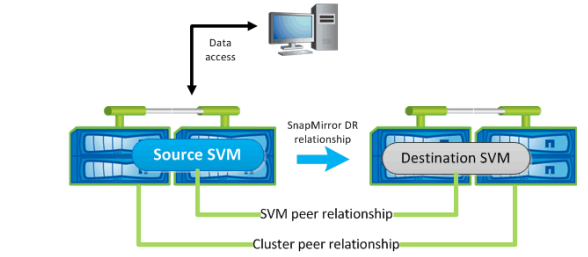
Snapmirror software permits to replicate SVM directly to another cluster. Keep in mind that it depends on the configuration which element will be replicated.
There are two way to configure it :
- identity preserve set to true : replicates the entire SVM configuration
- identity preserve set to false : replicates only the volumes and authentication and authorization configurations of the SVM, and the protocol and name service settings listed in Configurations replicated in SVM disaster recovery relationships.
To recover from a disaster, you must activate the destination SVM.
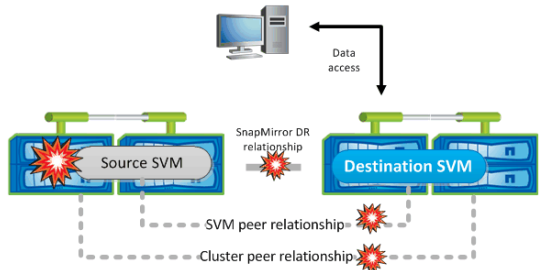
Activating the destination SVM involves :
- quiescing scheduled SnapMirror transfers,
- aborting any ongoing SnapMirror transfers,
- breaking the SVM disaster recovery (DR) relationship
- stopping the source SVM
- starting the destination SVM.
Prerequisites & Limitations
SVMs must use FlexVol volumes on clusters (infinite volume not supported).
Source or destination cluster in a MetroCluster configuration is supported but we do not perform SVM DR on SVM that are in MetroCluster configuration.
Source and destination cluster must have a snapmirror licence.
Source and destination cluster must be peered.
Source SVM can be on a MetroCluster node configuration but if it is basculed to the other node it’s SVM DR relationship will be broken and not working anymore. So source SVM need to be on a MetroCluster configuration OR in a SVM DR configuration but not both.
Source SVM does not contain DP (data protection) or TDP (Transition data protection)
Source SVM cannot be a snapmirror destination SVM.
Source SVM does not contain any volume that resides in a FabricPool-enabled aggregate.
Source SVM root volume must not contain any other data apart from metadata because the root volume will not be replicated except root volume metadata such as volume junctions, symbolic links, directories leading to junctions symbolic links.
CIFS audit consolidation path must be on a non-root volume
SVM root volume must not have any qtrees
The destination cluster must have at least one non-root aggregate with a sufficient space (replicated datas).
If any clone parent or clone child volumes are moved by using the volume move command, then you must move the corresponding volume at the destination SVM.
Customer need to request to have the source storage VLAN tagged on the DCI. Ticket to L2 Network? (discussion ongoing to automatically configure the Storage VLAN on the DCI)
If the T0 is not stretched the customer have to provide all VM’s subnets & T0 Storage gateways on DR site that need to contact the Storage VLAN.
Information:
- All volumes will be replicated. An evolution will take place later to permit to choose/exclude volumes from DR configuration.
- SVM’s Network will always be replicated in SVM DR configuration.
RPO Configuration options
DR replication supports configurable RPO intervals with granular scheduling options, enabling tenants to select appropriate data protection levels based on their business requirements and criticality assessments:
- 15-minute intervals: From 15 minutes to 1 hour (15, 30, 45, 60 minutes)
- Maximum data protection for critical workloads
- Fine-grained recovery points for mission-critical applications
- Hourly intervals: From 1 hour to 12 hours (1, 2, 3, 4, 6, 8, 12 hours)
- 1 hour: Balanced protection for important workloads
- 4 hours: Standard protection for normal workloads
- 12 hours: Cost-optimized protection for non-critical workloads
Management interface
- A self-service portal is provided to the customer for network storage management. Using the portal, the customer can :
- Create NFS v3 shares
- Create SMB/CIFS shares
- Adjust share quotas
- Set rights, manage the list of VMs (NFS) or users (CIFS) with access to a share
- Manage access rights from local accounts and locally-managed rights
- Manage access rights by connecting an LDAP (Active Directory) directory to the SVM, if the customer already has an AD on his infrastructure
- Restore all or part of a backup snapshot (copy files from a client VM)
Link to the shared storage management portal user manual.
Billing
The storage taken into account is the average storage reserved by the customer during the reference month. The quantity of IOPS actually provided corresponds to the volume of storage ordered times the number of IOPS/Gb of the class of service subscribed.
Example: 500 GB of Platinum 3K network storage enables 1500 IOPS to be used permanently, regardless of the number of VMs using this storage.
A flat-rate monthly fee is applied as soon as the first SVM is created.
The meaning of the abbreviations TB or To in our pricing grid is aligned with what you see in the technical consoles (VCD, NSS, …).
Cloud Avenue storage is calculated in binary gigabytes (GB), where 1 GB is 230 bytes. This unit of measurement is also known as a gibibyte (GiB), defined by the International Electrotechnical Commission (IEC). Similarly, 1 TB is 240 bytes, i.e. 1024 GBs.
Principles and limitations
- iSCSI is not yet available directly on the shared storage portal.
- Volumes can be either Unix or Windows (no mix mode).
- Customers can self-create up to 6 volumes per SVM, from 500 GB to 10 TB. For additional volumes or volumes larger than 10 TB, the request must be made via a ticket. Volumes larger than 10 TB will have the same QOS policy as 10 TB (capping).
- Sharing/exporting is done at tree level.
- A share (Windows) is created on a Windows qtree on a Windows volume.
- An export is created in a Unix qtree on a Unix volume.
- APIs are REST API compatible.