Cloud Avenue Wiki
-
Overview
-
Practical sheets
-
-
- Aucun article
-
-
- Aucun article
-
-
-
- Backup : Agent-Level B&R via NSS for IAAS offer
- Backup : Create VCOD Backup
- Backup : Netbackup Agent Installation for Linux
- Backup : Netbackup Agent Installation for Windows
- Backup : Overall Design for VCOD Offer
- Backup : User's Guide for VCOD Offer
- NSX-T : Configuring a Distributed Firewall
- NSX-T : Create VPN Ipsec
- NSX-T : Creation of T1
- NSX-T : DNAT configuration
- NSX-T : How to configure a Gateway Firewall
- NSX-T : SNAT configuration
- NSX-T: Create and Configure a Geneve Overlay Segment
- NSX-T: How to configure an IPSEC solution
- vCenter : Clone a VM
- VCenter : Create a new VM
- VCenter : Create a snapshot of a VM
- VCenter : Reset cloudadmin password
- VCenter : Storage Vmotion on a VM
- VCenter : Upgrade Vmware tools on a VM
-
-
Q & A
-
Services
-
-
- Aucun article
-
- Aucun article
-
- Aucun article
-
- Aucun article
-
- Aucun article
-
- Aucun article
-
- Aucun article
-
-
-
- Aucun article
-
- Aucun article
-
- Aucun article
-
-
-
- Aucun article
-
- Aucun article
-
-
User Rights and Roles
Roles are visible in the Administration/Roles section.
You can create your own roles in the Organization by selecting the NEW button.
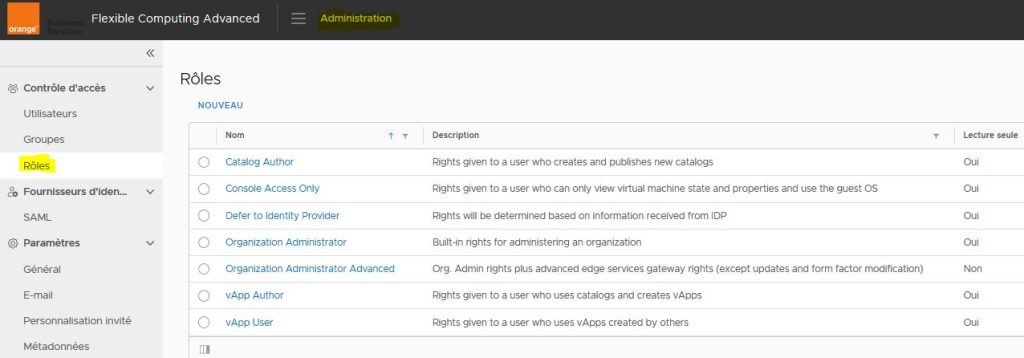
There are 7 predefined roles. Each user is assigned one of these roles:
| Roles | Features |
| Catalogue author | This user will be able to modify the Organization Catalogue and Application sections:
|
| vApp author | This user will only have a read-only view of the Library section and can edit Organization Applications and Networks:
|
| vApp user | This user will only have a read-only view of the Library and Applications sections:
|
| Defer to identity provider |
Users’ rights will be determined based on the information received from the identity provider. The name of the role or group specified by the IdP must match exactly, in upper and lower case, a role or group name defined in your organization. If no corresponding role or group name is available in your organization, the user will be able to log on, but without rights. |
| Console access only | A User will be able to view the status and properties of the VM and connect in console mode to the VM. |
| Organization administrator | Integrated rights to administer an Organization but without the advanced rights on the Gateway Edge |
| Advanced Organization administrator | Any control over the client organization with additional options on certain actions. (Administrator rights and advanced services gateway rights). |