Cloud Avenue Wiki
-
Overview
-
Practical sheets
-
-
- Aucun article
-
-
- Aucun article
-
-
-
- Backup : Agent-Level B&R via NSS for IAAS offer
- Backup : Create VCOD Backup
- Backup : Netbackup Agent Installation for Linux
- Backup : Netbackup Agent Installation for Windows
- Backup : Overall Design for VCOD Offer
- Backup : User's Guide for VCOD Offer
- NSX-T : Configuring a Distributed Firewall
- NSX-T : Create VPN Ipsec
- NSX-T : Creation of T1
- NSX-T : DNAT configuration
- NSX-T : How to configure a Gateway Firewall
- NSX-T : SNAT configuration
- NSX-T: Create and Configure a Geneve Overlay Segment
- NSX-T: How to configure an IPSEC solution
- vCenter : Clone a VM
- VCenter : Create a new VM
- VCenter : Create a snapshot of a VM
- VCenter : Reset cloudadmin password
- VCenter : Storage Vmotion on a VM
- VCenter : Upgrade Vmware tools on a VM
-
-
Q & A
-
Services
-
-
- Aucun article
-
- Aucun article
-
- Aucun article
-
- Aucun article
-
- Aucun article
-
- Aucun article
-
- Aucun article
-
-
-
- Aucun article
-
- Aucun article
-
- Aucun article
-
-
-
- Aucun article
-
- Aucun article
-
-
Affinity / Anti-Affinity Rules
Overview
For performance reasons, for example, you can Create an affinity rule. The DRS (Distributed Resource Scheduler) will then keep the VMs on the same ESXi host.
Otherwise, with a anti-affinity rule, the DRS will maintain the VMs on different ESXi hosts to, for example, prevent access failure if one ESXi host goes down.
More details: HERE
Prerequisites
Affinity Rules
From the Data Center tab > Click on a Data Center > Affinity Rules > NEW
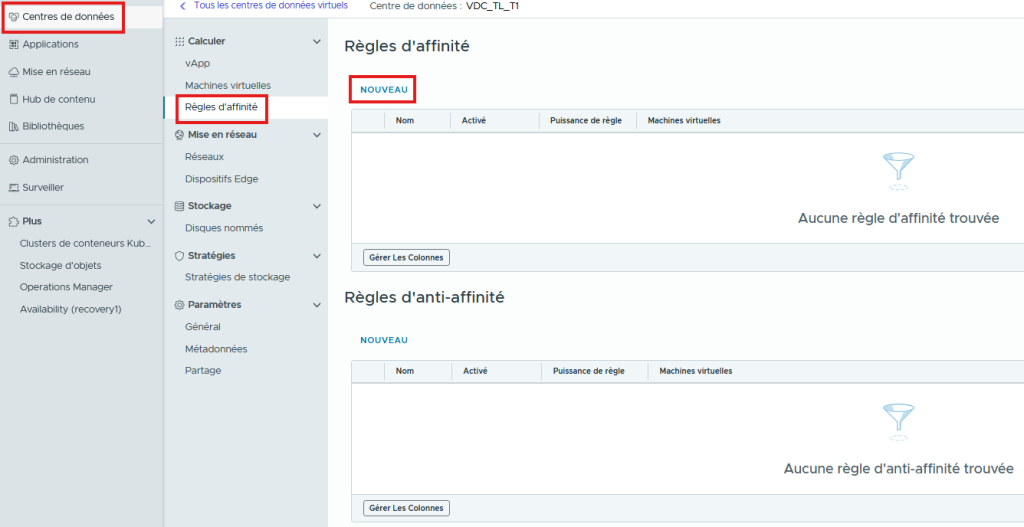
Define:
- A Name for the rule
- Check the boxes Enabled and Required
- The VMs to add to the rule
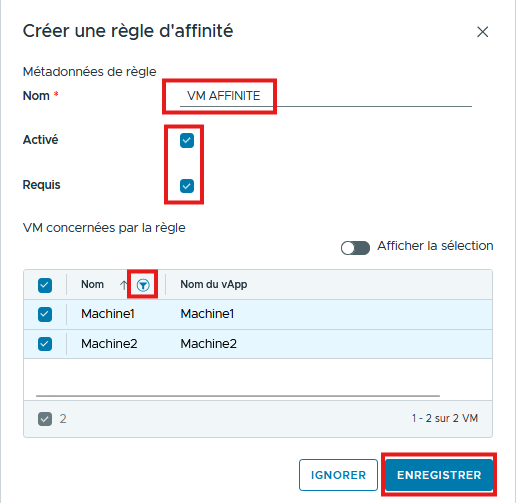
Click the SAVE button to save. The rule is created, and the 2 VMs will run on the same ESXi.

Anti-Affinity Rules
Select NEW and define:
- A Name for the rule
- Check the boxes Enabled and Required
- The VMs to add to the rule
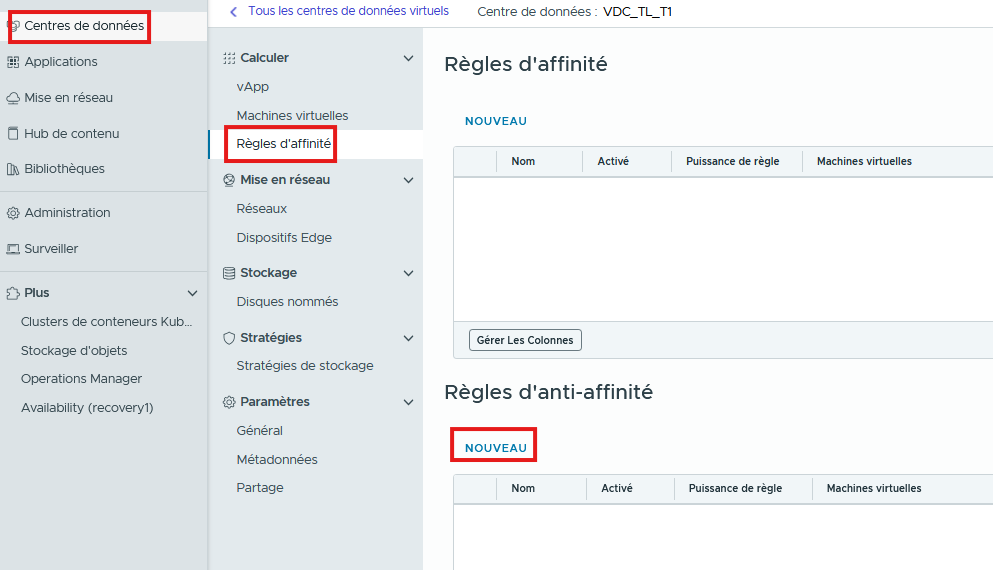

The rule is created, and the 2 VMs are on different ESXi hosts.

You can Edit or Delete the rules using the buttons