-
Overview
-
Practical sheets
-
-
- Aucun article
-
-
- Aucun article
-
-
-
- Backup : Agent-Level B&R via NSS for IAAS offer
- Backup : Create VCOD Backup
- Backup : Netbackup Agent Installation for Linux
- Backup : Netbackup Agent Installation for Windows
- Backup : Overall Design for VCOD Offer
- Backup : User's Guide for VCOD Offer
- NSX-T : Configuring a Distributed Firewall
- NSX-T : Create VPN Ipsec
- NSX-T : Creation of T1
- NSX-T : DNAT configuration
- NSX-T : How to configure a Gateway Firewall
- NSX-T : SNAT configuration
- NSX-T: Create and Configure a Geneve Overlay Segment
- NSX-T: How to configure an IPSEC solution
- vCenter : Clone a VM
- VCenter : Create a new VM
- VCenter : Create a snapshot of a VM
- VCenter : Reset cloudadmin password
- VCenter : Storage Vmotion on a VM
- VCenter : Upgrade Vmware tools on a VM
-
-
Q & A
-
Services
-
-
- Aucun article
-
- Aucun article
-
- Aucun article
-
- Aucun article
-
- Aucun article
-
- Aucun article
-
- Aucun article
-
-
-
- Aucun article
-
- Aucun article
-
- Aucun article
-
-
-
- Aucun article
-
- Aucun article
-
-
Accessing OSE from a VM in Your Tenant
By default, direct communication between the virtual datacenter networks and the OSE plugin APIs is inactive.
To enable this feature, you need to create the a Source NAT (SNAT) rule on your T1 gateway (edge gateway).
Creating the Source NAT rule
On the vCloud Director console, go to the “Networking” tab and click on “Edge Gateways.”

Click on the Edge gateway used by your virtual data center.
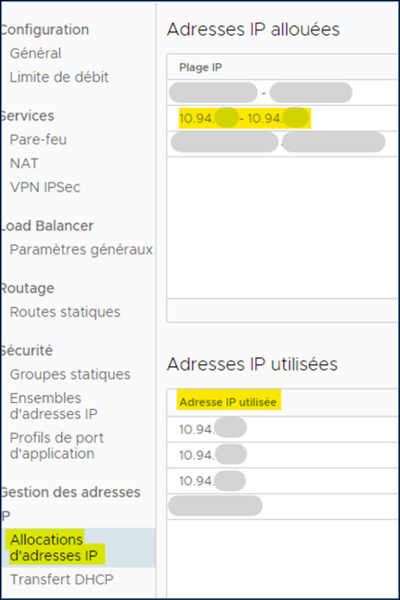
In the left-hand menu, click on “IP Address Allocations” in the “IP Address Management” submenu.
Check the IP addresses used in the 10.94.x.x range allocated to your Edge gateway to select an available one.
This IP address will be used in the next step.
In the left-hand menu, click on “NAT” in the “Services” submenu.
Click on “New.”
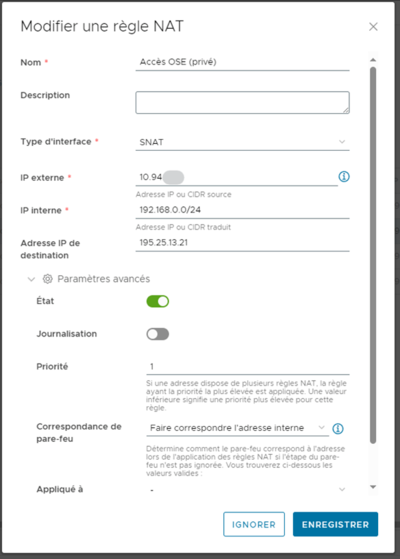
Fill in the fields as follows:
Name:
OSE Access
Interface type:
SNAT
External IP:
The IP chosen in the previous step.
Internal IP:
Local network IP range.
Destination IP:
OSE IP on the internal IaaS (here 195.25.13.21).
Then open the advanced settings.
Priority:
Choose the desired priority level in relation to any other rules in place. Priority 0 = highest priority.
Then click on “Save”.