-
Overview
-
Practical sheets
-
-
- Aucun article
-
-
- Aucun article
-
-
-
- Backup : Agent-Level B&R via NSS for IAAS offer
- Backup : Create VCOD Backup
- Backup : Netbackup Agent Installation for Linux
- Backup : Netbackup Agent Installation for Windows
- Backup : Overall Design for VCOD Offer
- Backup : User's Guide for VCOD Offer
- NSX-T : Configuring a Distributed Firewall
- NSX-T : Create VPN Ipsec
- NSX-T : Creation of T1
- NSX-T : DNAT configuration
- NSX-T : How to configure a Gateway Firewall
- NSX-T : SNAT configuration
- NSX-T: Create and Configure a Geneve Overlay Segment
- NSX-T: How to configure an IPSEC solution
- vCenter : Clone a VM
- VCenter : Create a new VM
- VCenter : Create a snapshot of a VM
- VCenter : Reset cloudadmin password
- VCenter : Storage Vmotion on a VM
- VCenter : Upgrade Vmware tools on a VM
-
-
Q & A
-
Services
-
-
- Aucun article
-
- Aucun article
-
- Aucun article
-
- Aucun article
-
- Aucun article
-
- Aucun article
-
- Aucun article
-
-
-
- Aucun article
-
- Aucun article
-
- Aucun article
-
-
-
- Aucun article
-
- Aucun article
-
-
NTP Configuration
Please note !
Your VM must have access to the SUO service area.
Perform a ‘netstat -nrv’ in the appropriate shell and check that a persistent route is set up to subnet 57.199.209.192/27 via the Admin Subnet Gateway, otherwise please add this persistent route.
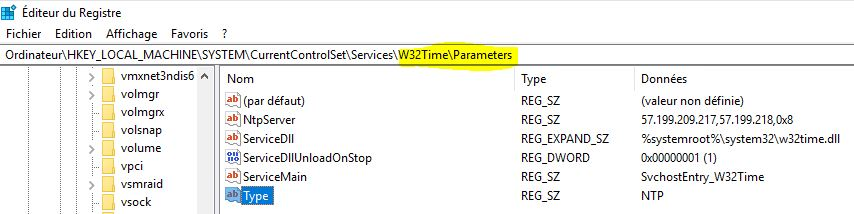
Check the Windows HKEY_LOCAL_MACHINESYSTEMCurrentControlSetServicesW32TimeParameters registry for the following entries:
- NTP Server: 57.199.209.217,57.199.209.218,0×8
- Type : NTP
Please note !
By default, this allows you to access the two time servers located in the datacenter where your VM is located.
If you wish to set up the two time servers located in the other datacenter, you can add them as follows:
- From VDR (Val de Rueil FRANCE), using the two additional IPs 57.199.209.199 and 57.199.209.200
- From CHA (CHARTRES FRANCE) using the two additional IPs 57.199.209.194 and 57.199.209.195
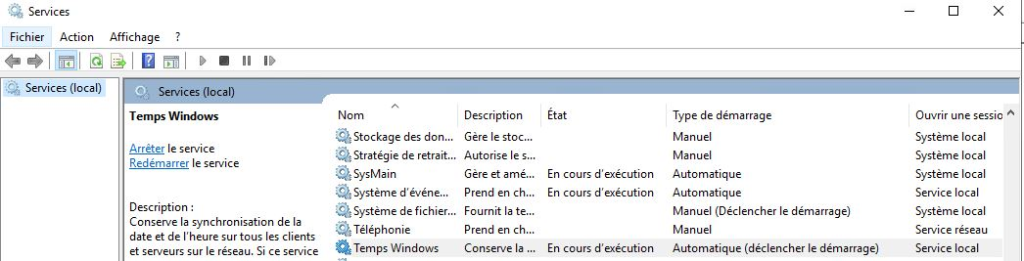
Check that the Windows Time Services on your VMs are :
- Started and Automatic
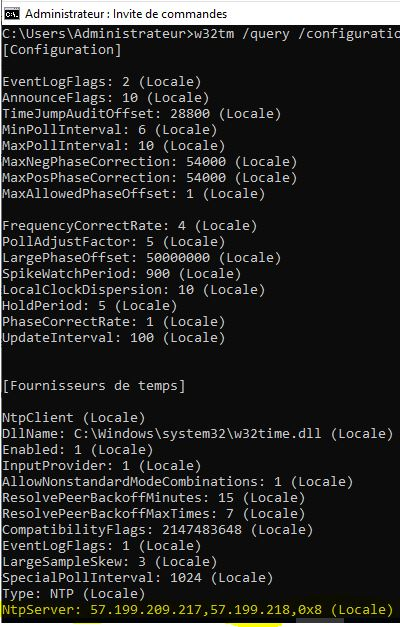
Check the state of affaires with the command :
- w32tm /query /configuration
If necessary, you can always force synchronization as such on Windows platforms:
- w32tm /resync