Cloud Avenue Wiki
-
Overview
-
Practical sheets
-
-
- Aucun article
-
-
- Aucun article
-
-
-
- Backup : Agent-Level B&R via NSS for IAAS offer
- Backup : Create VCOD Backup
- Backup : Netbackup Agent Installation for Linux
- Backup : Netbackup Agent Installation for Windows
- Backup : Overall Design for VCOD Offer
- Backup : User's Guide for VCOD Offer
- NSX-T : Configuring a Distributed Firewall
- NSX-T : Create VPN Ipsec
- NSX-T : Creation of T1
- NSX-T : DNAT configuration
- NSX-T : How to configure a Gateway Firewall
- NSX-T : SNAT configuration
- NSX-T: Create and Configure a Geneve Overlay Segment
- NSX-T: How to configure an IPSEC solution
- vCenter : Clone a VM
- VCenter : Create a new VM
- VCenter : Create a snapshot of a VM
- VCenter : Reset cloudadmin password
- VCenter : Storage Vmotion on a VM
- VCenter : Upgrade Vmware tools on a VM
-
-
Q & A
-
Services
-
-
- Aucun article
-
- Aucun article
-
- Aucun article
-
- Aucun article
-
- Aucun article
-
- Aucun article
-
- Aucun article
-
-
-
- Aucun article
-
- Aucun article
-
- Aucun article
-
-
-
- Aucun article
-
- Aucun article
-
-
Activate Windows License (KMS)
Note!
The VM must have access to the SUO service zone.
Run a netstat -nrv and check that a persistent route to the subnet 57.199.209.192/27 exists via the Admin Subnet Gateway; otherwise, add the route.
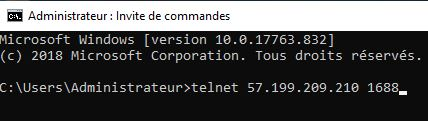
- Test the connection to the Orange KMS server as follows:
telnet 57.199.209.210 1688
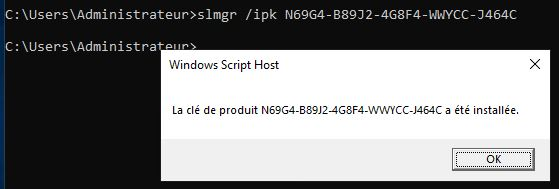
- Optional if VM is imported or created “from scratch”: Reposition the Windows product key to be activated according to OS type (here).
slmgr /ipk *****-*****-*****-*****-*****
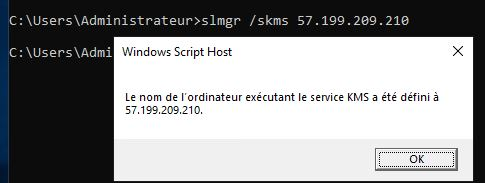
- Optional if VM has been imported or created “from scratch”: Please specify the KMS server address as follows:
slmgr /skms 57.199.209.210
- Activate Windows as follows:
slmgr /ato
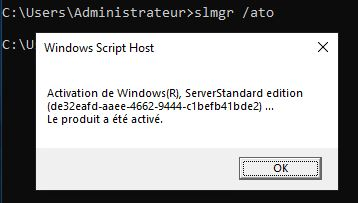
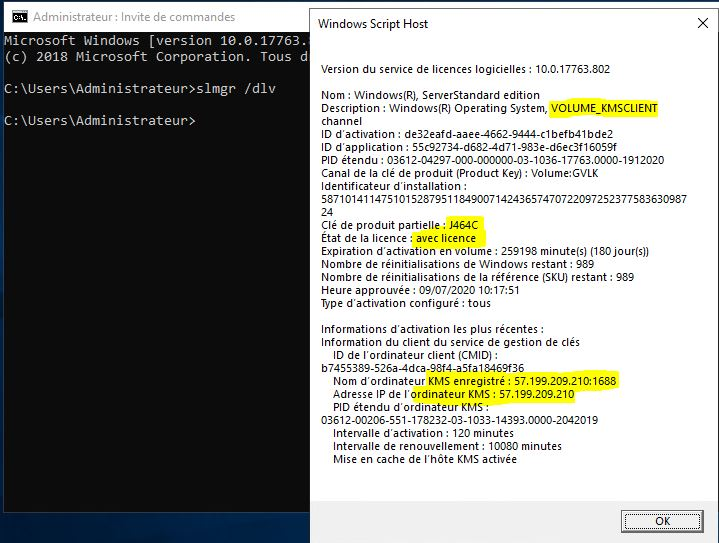
- Please check your license activation
slmgr /dlv