Cloud Avenue Wiki
-
Overview
-
Practical sheets
-
-
- Aucun article
-
-
- Aucun article
-
-
-
- Backup : Agent-Level B&R via NSS for IAAS offer
- Backup : Create VCOD Backup
- Backup : Netbackup Agent Installation for Linux
- Backup : Netbackup Agent Installation for Windows
- Backup : Overall Design for VCOD Offer
- Backup : User's Guide for VCOD Offer
- NSX-T : Configuring a Distributed Firewall
- NSX-T : Create VPN Ipsec
- NSX-T : Creation of T1
- NSX-T : DNAT configuration
- NSX-T : How to configure a Gateway Firewall
- NSX-T : SNAT configuration
- NSX-T: Create and Configure a Geneve Overlay Segment
- NSX-T: How to configure an IPSEC solution
- vCenter : Clone a VM
- VCenter : Create a new VM
- VCenter : Create a snapshot of a VM
- VCenter : Reset cloudadmin password
- VCenter : Storage Vmotion on a VM
- VCenter : Upgrade Vmware tools on a VM
-
-
Q & A
-
Services
-
-
- Aucun article
-
- Aucun article
-
- Aucun article
-
- Aucun article
-
- Aucun article
-
- Aucun article
-
- Aucun article
-
-
-
- Aucun article
-
- Aucun article
-
- Aucun article
-
-
-
- Aucun article
-
- Aucun article
-
-
Create a Set of IP Addresses
Overview
The “IP Address Sets” Groups are useful in managing your Firewall rules.
They are hosted on a T1 Edge or on a VDC Group. More details HERE
Prerequisites
Be familiar with your network infrastructure
IP Address Sets
You can use these Groups on your T1 Edge and/or the Distributed Firewall
- From the Networking / Edge Gateways / IP Address Sets / NEW section

Give a Name then select the IP Addresses of the desired VMs
You can then create Firewall rules on the T1 by adding, in the Source and Destination section, these IP address Groups.
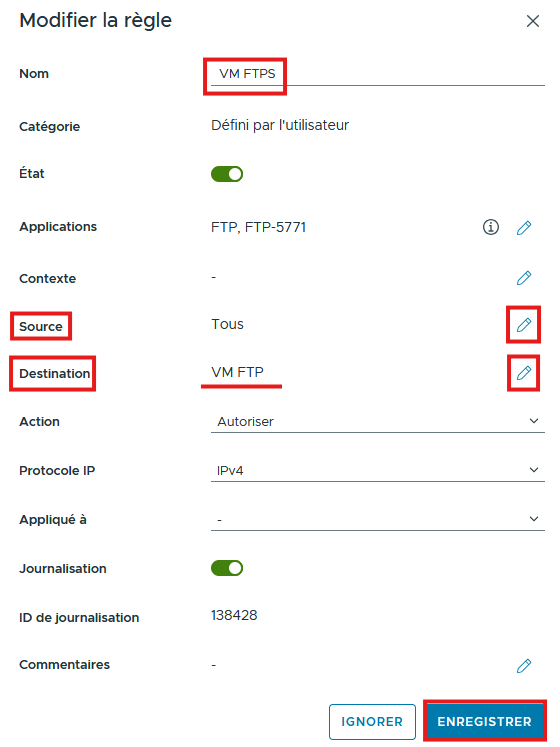
It is possible to perform the same type of operation on MAC @ from the MAC Address Sets tab. More details HERE