Cloud Avenue Wiki
-
Overview
-
Practical sheets
-
- Add a NetBackup User
- Backing up a VM
- Backup : Agent-Level B&R via NSS for IAAS offer
- Checking Backup Prerequisites
- Daily Reporting
- Deleting a VM Backup
- Identifying Your Backup Master Server
- NetBackup Portal
- NSS Home Page
- NSS Swagger APIs
- Restoring a VM
- Troubleshooting Netbackup Errors
- VM Agent Restoration Mode
-
-
- Aucun article
-
-
- Aucun article
-
-
-
- Backup : Agent-Level B&R via NSS for IAAS offer
- Backup : Create VCOD Backup
- Backup : Netbackup Agent Installation for Linux
- Backup : Netbackup Agent Installation for Windows
- Backup : Overall Design for VCOD Offer
- Backup : User's Guide for VCOD Offer
- NSX-T : Configuring a Distributed Firewall
- NSX-T : Create VPN Ipsec
- NSX-T : Creation of T1
- NSX-T : DNAT configuration
- NSX-T : How to configure a Gateway Firewall
- NSX-T : SNAT configuration
- NSX-T: Create and Configure a Geneve Overlay Segment
- NSX-T: How to configure an IPSEC solution
- vCenter : Clone a VM
- VCenter : Create a new VM
- VCenter : Create a snapshot of a VM
- VCenter : Reset cloudadmin password
- VCenter : Storage Vmotion on a VM
- VCenter : Upgrade Vmware tools on a VM
-
-
Q & A
-
Services
-
-
- Aucun article
-
- Aucun article
-
- Aucun article
-
- Aucun article
-
- Aucun article
-
- Aucun article
-
- Aucun article
-
-
-
- Aucun article
-
- Aucun article
-
- Aucun article
-
-
-
- Aucun article
-
- Aucun article
-
-
Add a NetBackup User
By default, two users are automatically added:
- The account administrator, who is linked to the contract referrer.
- An “API” user, who can query the NSS API.
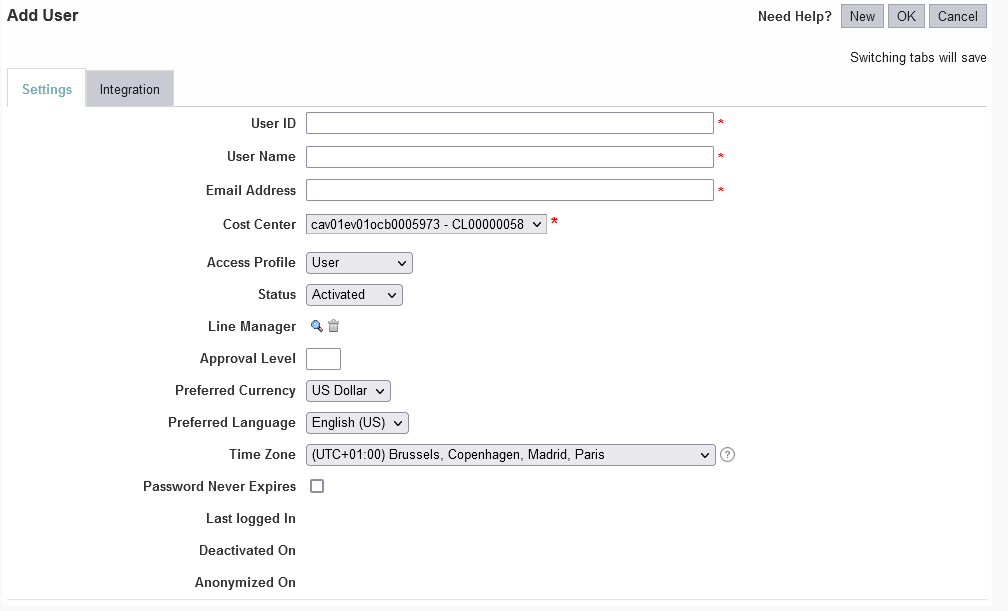
Additional users can be added via the NSS portal.
- From the “Dashboard” page, click the “gear” icon in the top-right corner.
- On the “Administration” page that appears, select “User Management.”
- The list of existing users will appear; click the “New” button in the top-right corner.
- Fill out the various configuration fields to add the details for your new user.