VM Replication
Overview
vCloud Director includes a basic tool (VCDA) for replicating virtual machines, thus protecting them from unavailability of the underlying infrastructure.
Use case
With VCDA, you can replicate VMs :
- between 2 vDCs in the same organization
- between 2 organizations on the same site
- between 2 organizations located on 2 different sites
In the last case, of course, you can set up a disaster recovery plan.
VCDA will also be used for DRaaS, a service that is already in use in many countries. It is described on cette page.
Prerequisites
None, VCDA is present and usable in the VCD console.
But to set up a DRP between VDR and CHA, you need to have ordered 2 organizations, one on each site.
Topology and naming rules
Schema
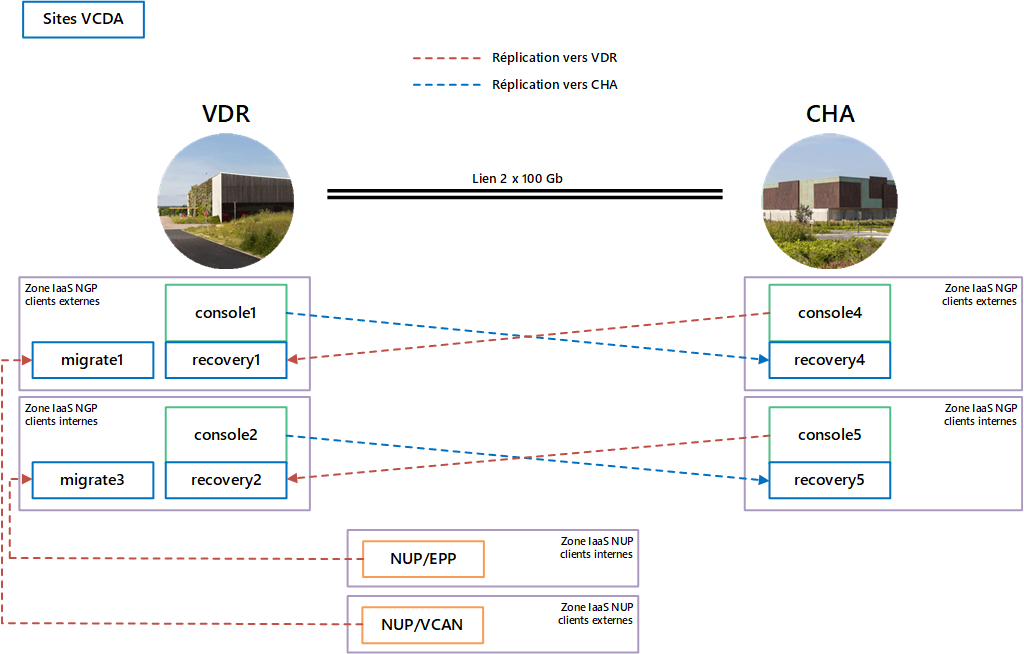
Definition of VCDA sites
Each IaaS zone is accessible via a VCD console, which differs according to the site and zone type.
| Site | Console VCD | Scope | Site VCDA |
| VDR | console 1 | access to the IaaS zone allocated to external customers | recovery 1 |
| console 2 | access to the IaaS zone allocated to internal customers | recovery 2 | |
| CHA | console 4 | access to the IaaS zone allocated to external customers | recovery 4 |
| console 5 | access to the IaaS zone allocated to internal customers | recovery 5 |
Internal customers are customers of the Orange Group who have privileged access to certain resources reserved for Orange.
If the name of an organization starts with cav01evxxxxxxx, it is an organization hosted on the external IaaS site of the VDR zone (the 01 stands for console1 and the e for external IaaS).
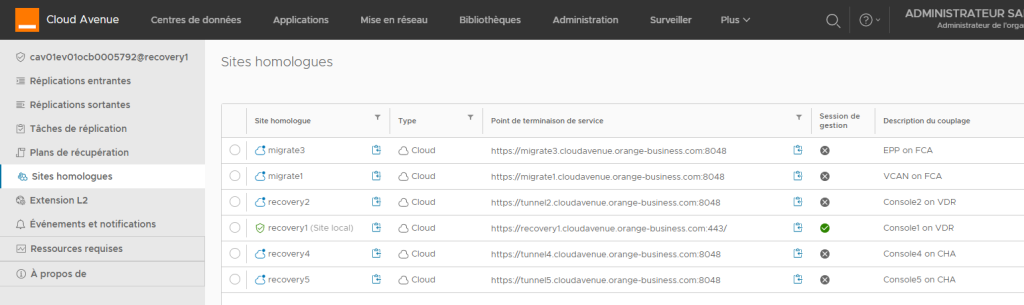
A VCDA site is the access point for configuring replication between sites. Each VCD site (consolex) has its own VCDA site (recoveryx), as shown in the diagram above.
Please note !
Two VCDA sites, migrate1 and migrate3, enable our migration teams to migrate VMs from the Cloud Avenue platform to the NGP platform.
VCDA console
This is what you see on the VCDA console from a console organization1 :
How to set up
Replication setup is described step-by-step on this page.
Billing
Principle
Invoicing is based on three elements:
- The number of protected VMs
- The replication policy used
- Inter-site traffic generated (per GB transferred).
Please refer to the price list for details.
Replication policies
| Replication policy | RPO | Retention |
| Bronze | 24h | only the last copy |
| Silver | 6h | only the last copy |
| Silver + | 6h | a 24-hour copy |
| Gold | 1h | only the last copy |
| Gold + | 1h | 3 copies stored over 3 days |
| Platinium | 5 min | only the last copy |
| Platinium + | 5 min | 7 copies stored over 7 days |
A VM can only have one replication policy.
Recommended storage policy

For further information
Visit the vwmare website on VCDA.