-
Overview
-
Practical sheets
-
-
- Aucun article
-
-
- Aucun article
-
-
-
- Backup : Agent-Level B&R via NSS for IAAS offer
- Backup : Create VCOD Backup
- Backup : Netbackup Agent Installation for Linux
- Backup : Netbackup Agent Installation for Windows
- Backup : Overall Design for VCOD Offer
- Backup : User's Guide for VCOD Offer
- NSX-T : Configuring a Distributed Firewall
- NSX-T : Create VPN Ipsec
- NSX-T : Creation of T1
- NSX-T : DNAT configuration
- NSX-T : How to configure a Gateway Firewall
- NSX-T : SNAT configuration
- NSX-T: Create and Configure a Geneve Overlay Segment
- NSX-T: How to configure an IPSEC solution
- vCenter : Clone a VM
- VCenter : Create a new VM
- VCenter : Create a snapshot of a VM
- VCenter : Reset cloudadmin password
- VCenter : Storage Vmotion on a VM
- VCenter : Upgrade Vmware tools on a VM
-
-
Q & A
-
Services
-
-
- Aucun article
-
- Aucun article
-
- Aucun article
-
- Aucun article
-
- Aucun article
-
- Aucun article
-
- Aucun article
-
-
-
- Aucun article
-
- Aucun article
-
- Aucun article
-
-
-
- Aucun article
-
- Aucun article
-
-
User Management
Overview
As explained here, there are two types of accounts: federated and local.
Prerequisites
- Know how to access Portail vCloud Director
Federated accounts
The management of federated accounts is done from the Cloud Client Area, in the Rights menu.
See the support pages of the Cloud Customer Center for more help on how to use this portal.
Local accounts
Local accounts are created directly in the vCloud Director portal with a “Local” type.
Accounts of type “SAML” are those that are federated and managed at the level of the Client Cloud Space. It is recommended that you do not remove them directly in vCD, but go through the ECC to do so.
Please note !
Each client organization is created with a User(s) having the role of Advanced Organization Administrator. These users have the possibility to create other users with associated roles.
Users are visible in the Administration > Users section.
The nbuser or nssuser user allows to synchronize vCD with NetBackup.
Do not delete or deactivate these user accounts.
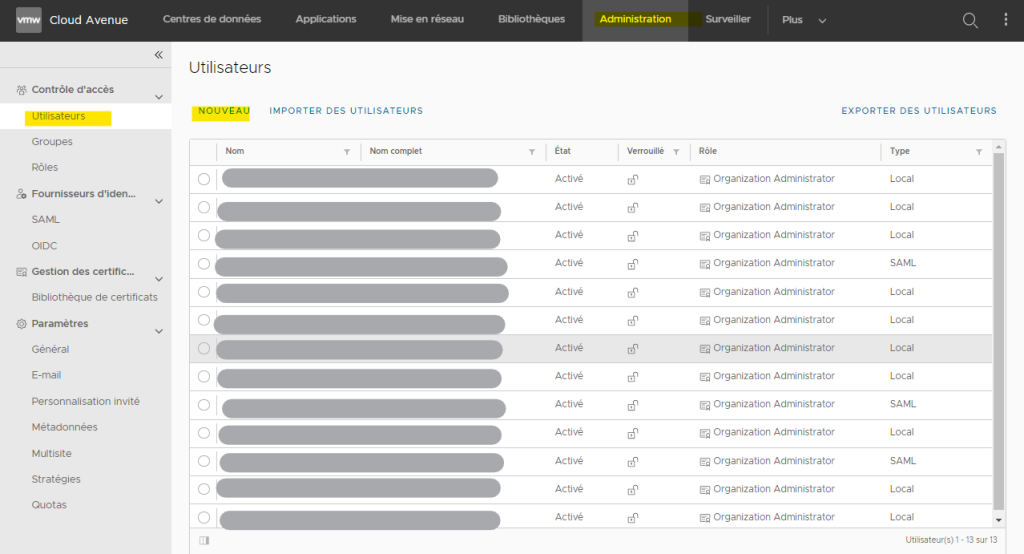
You can create a new user by clicking on NEW.
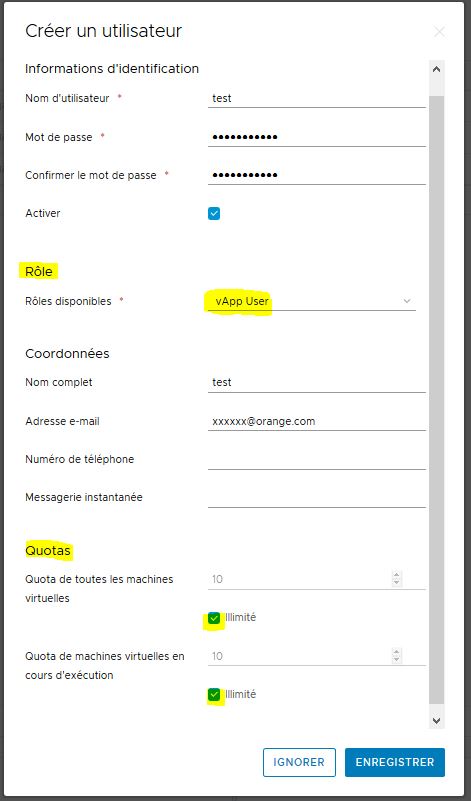
- Set user name, password and role
- In the Quotas section, check ‘Unlimited options’.