Object Storage Overview
Presentation
Object storage is an Internet storage service designed to facilitate the management of large quantities of data.
A simple Web service interface enables you to access and modify your data, at any time and from anywhere on the Web. This interface is compatible with the API used by Amazon Web Services called Simple Storage Service, or S3 for short. The basic concepts are as follows.
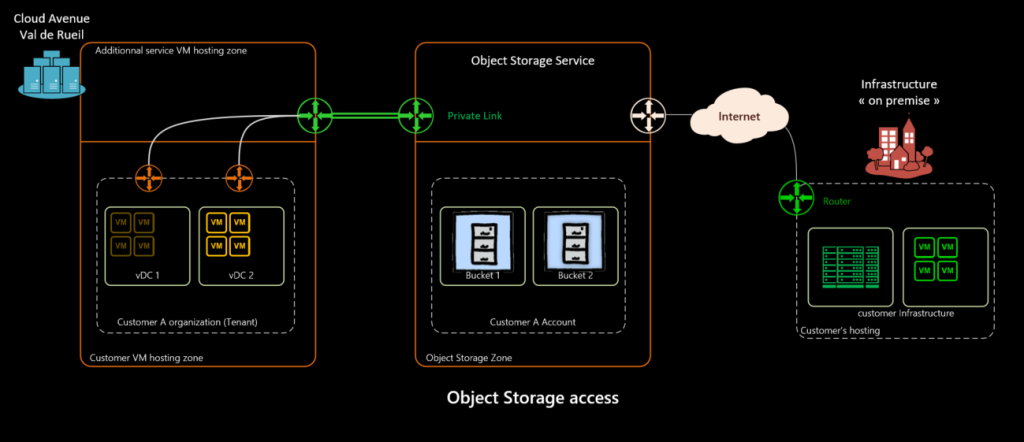
The object storage service offer at Cloud Avenue is directly accessible from your Cloud Avenue organization.
Simple Storage Service (S3)
The S3 standard is an object storage web service solution originating at Amazon. Our Cloud Avenue service is delivered over the Web or via Cloud Avenue networks by means of an S3- compliant REST API.
The ease of implementation for development and the rapid progression of cloud computing have led to the success of S3 and the adoption of its API for storage in general.
Object storage is particularly relevant to hardware and/or storage and the public/private/mixed cloud environments. It can be used by all applications running on mobiles, PCs or servers.
Cloud Avenue uses Scality’s Ring product to provide S3 API-compliant object storage.
Objects
Objects are the fundamental entities stored. An object is made up of data and its associated metadata.
Data is the content of the object. A JPEG photo, a PDF document or a ZIP archive are all good examples.
Metadata provides information about the object. For example, the last modification date, standard HTTP metadata such as the MIME Content-Type, or specific user-defined information.
An object is uniquely identified in a Bucket by a key (name) and a version ID (identifier).
Buckets
Buckets are object containers; an object is necessarily contained in a Bucket.
The Bucket is one of the elements used to access an object.
For example, if the object factu_2020.xls is present in the invoicing Bucket, it will be possible to access the object via the url “https://s3-region01.cloudavenue.orange-business.com/invoicing/factu_2020.xls”.
Once created, a Bucket cannot be used by another client, unless you delete it.
Bucket Naming limitations :
- Buckets are shared amongst all customers (1st come, 1st served)
- Bucket names are between 3 and 63 characters long
- Bucket names can contain lower-case letters, numbers, hyphens (-) and periods (.)
- Bucket names must begin and end with a letter or number
- Bucket names must not contain IP addresses
Hierarchical list (prefix and delimiter)
Within a Bucket, objects can be organized hierarchically using prefixes and delimiters. This greatly facilitates selective access to objects.
Prefixes can be considered as folders. The default delimiter is the slash ( / ) character.
Prefixes (or folders) are not really objects: it is therefore impossible to manipulate a prefix directly.
However, it is possible to copy/move a file to a Bucket by adding a hierarchy described with delimiters and prefixes. Take, for example, “/emea/en” in the “mycompany” folder.
The hierarchical relationship of “mycompany” to “emea” and to “en” will persist as long as an object is associated with “en”.
If the last object in “en” is deleted, the en prefix will automatically be pruned.
Version ID
An object is uniquely identified by its Bucket, key and version identifier.
Most of the time, the version identifier is omitted because versioning is not enabled on the Bucket. In this case, only one version of the object exists: the current version.
On the other hand, if the Bucket versioning is enabled, it becomes necessary to specify the version ID in requests. This is because every action performed on the object will create a new version of the object, including deletion.
Version management in a Bucket enables you to keep a history of actions for all objects. This makes it possible to roll back one or more objects in the event of unintentional action by a user or an application error.
Web service endpoints
The Web service endpoint is the hostname or URL you use to access Cloud Avenue using the HTTPS protocol.
More details on these access points are available on this page: how to reach object storage
Identity and access management (IAM)
IAM is an access management service defined by Amazon Web Services through a web service interface based on the REST standard.
This interface controls access to S3 storage, by identifying users and authorizing access.
IAM identity
IAM identities are as follows :
- The root user (identified by access key),
- IAM users (identified by access key),
- IAM groups,
- IAM roles.
Root user
The root user is the individual with full, unrestricted access to any given storage account.
The Access and Secret Keys associated with the root user account are not provided; please contact your administrator to request them.
It is not possible to restrict the access rights of the root user account.
IAM user
To avoid sharing the root user account’s rights, it is possible to create individual IAM user accounts that represent the people or departments accessing the stored objects.
Like the root user account, each IAM user account has associated access and secret keys.
IAM groups
An IAM group is a collection of IAM user accounts.
Groups simplify authorization management as the number of user accounts increases.
Authorizations for a group automatically apply to all of its members.
IAM roles
An IAM role is similar to an IAM user account. However, it is not directly identifiable (no access key).
The role is designed to be used by an IAM user account on a temporary basis to obtain a specific authorization.
IAM policies
IAM policies are objects which, when associated with an IAM identity or resource (Bucket, object, etc.), define authorizations.
Strategies are stored as JSON documents.
Types of policies :
- Identity-based policy (applies to an IAM identity)
- Resource-based policy (applies to a bucket, for example)
- Authorization limits (applies to an IAM identity)
- Access Control List (ACL)
- Session policy